

The Witcher 3 · Next-Gen · Discord
Rich Presence
Automatically show your region, level, difficulty and in-game time on Discord. No launch flags. No save parsing. Pure real-time memory reading.
Preview
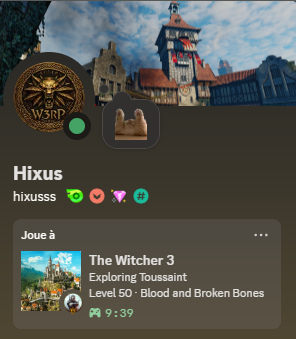
Automatically show your region, level, difficulty and in-game time on Discord. No launch flags. No save parsing. Pure real-time memory reading.
Everything you need, updated every 5 seconds
Velen, Skellige, Kaer Morhen, Toussaint and more — with a dedicated image for each area.
Real-time level from 1 to 200, read directly from process memory with AOB pattern scanning.
Just the Story · Story and Sword · Blood and Broken Bones · Death March.
The current in-game hour and minute, synced with the world's day-night cycle.
No terminal window. A small W3 icon sits in your taskbar. Right-click to quit.
Detects your Witcher 3 folder automatically via Steam or GOG registry and installs the mod on first launch.
Three layers working together
A lightweight mod hooks into CR4Player.OnSpawned and writes a memory block tagged W3RP every 5 seconds — region, difficulty, level and time.
Scans process memory for the W3RP magic signature, reads the block and decodes the values. Read-only. No injection, no DLL.
Pushes updates via pypresence every 5 seconds with the current region image, level and difficulty.
One file. Double-click. Done.
W3RichPresence.exeOn first launch it automatically detects your Witcher 3 installation and copies the mod into Mods/. No configuration needed.
The mod compiles automatically on startup. The tray icon updates within 5 seconds of loading a save.